Bitcoin security becomes more important as soon as you move beyond basic buying and holding. Once you understand what Bitcoin is, the next step is learning how to protect it, avoid Bitcoin scams, use the Bitcoin Lightning Network, understand future Bitcoin upgrades, and explore Bitcoin privacy tools like CoinJoin, Wasabi Wallet, and Taproot-based privacy improvements.
This guide is built for users who already know the basics of Bitcoin and want a more advanced security framework for 2026. The goal is simple: protect your BTC, avoid common mistakes, understand self-custody, and learn how advanced Bitcoin tools work without turning security into something confusing.
Bitcoin is powerful because it gives users direct control over money. But that control also creates responsibility. There is no “forgot password” button for a lost seed phrase. There is no bank support desk that can reverse a transaction after a phishing attack. Good Bitcoin security is not optional. It is the foundation of long-term self-custody.
Bitcoin Security Best Practices 2026
Why Bitcoin Security Matters More in 2026
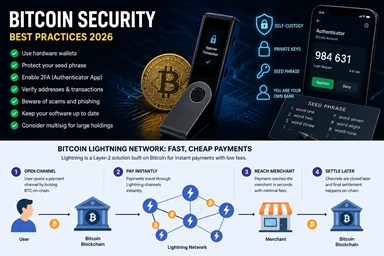
Bitcoin security best practices 2026 are different from the early days of Bitcoin. In the past, the biggest risk for many users was simply not understanding wallets. Today, threats are more advanced: fake wallet apps, phishing sites, clipboard malware, address poisoning, fake support accounts, compromised browser extensions, and supply-chain risks.
The biggest shift is responsibility. When you keep Bitcoin on an exchange, the platform controls the withdrawal flow. When you use self-custody, you control the keys. That is the entire point of Bitcoin, but it also means your seed phrase, hardware wallet, passphrase, and backup setup become the security system.
A seed phrase is the master backup for a wallet. If someone gets it, they can steal the funds. Cobo’s 2026 wallet security guide describes the seed phrase as the most critical security task and warns against storing it digitally in screenshots, cloud storage, email, or text files.
Strong Bitcoin security starts with a simple rule: protect the keys before you chase advanced tools.
Hardware Wallets, Cold Storage, and Multisig
A hardware wallet keeps your private keys offline. This is one of the most important upgrades from a hot wallet, where private keys are stored on an internet-connected phone or computer.
For small amounts, a mobile wallet may be convenient. For serious long-term savings, a hardware wallet or cold storage setup is usually safer. A strong wallet security setup might include:
| Security layer | Why it matters |
|---|---|
| Hardware wallet | Keeps private keys offline |
| Seed phrase backup | Restores wallet if device is lost |
| Metal backup | Protects seed phrase from fire or water |
| Passphrase | Adds an extra secret layer |
| Watch-only wallet | Lets you monitor funds without signing |
| Multisig | Requires multiple keys to move funds |
A single-signature hardware wallet is often enough for beginners and intermediate users. Multisig becomes useful when you want extra resilience. With multisig, one lost or stolen key does not automatically mean the funds are gone. For example, a 2-of-3 multisig setup may require two separate keys to sign a transaction.
But multisig is not magic. It adds complexity. If you do not understand your backup setup, you can lock yourself out. Good Bitcoin security means using the strongest setup you can actually manage safely.
2FA, Phishing, and Address Verification
2FA is essential for exchange accounts, email accounts, password managers, and any service connected to your Bitcoin activity. Authenticator-app 2FA is usually better than SMS because SIM-swap attacks can target phone numbers. Hardware security keys can be even stronger for important accounts.
Use 2FA everywhere, but remember this: 2FA does not protect a seed phrase. If someone tricks you into typing your seed phrase into a fake website, 2FA cannot save you.
Phishing is one of the most common Bitcoin security failures. Scammers create fake wallet sites, fake exchange login pages, fake airdrops, and fake support accounts. They use urgency: “verify now,” “claim now,” “your wallet is at risk,” or “your account will be suspended.”
Before sending Bitcoin, always verify the receiving address on your hardware wallet screen. Clipboard malware can replace an address after you copy it. Address poisoning can place lookalike addresses in your transaction history. Good transaction verification means checking the full address, not only the first and last characters.
A simple Bitcoin security checklist:
| Step | Action |
|---|---|
| 1 | Buy hardware wallets directly from official manufacturers |
| 2 | Never type your seed phrase into a website |
| 3 | Use authenticator-app or hardware-key 2FA |
| 4 | Verify withdrawal addresses on-device |
| 5 | Bookmark official wallet and exchange domains |
| 6 | Test with a small transaction first |
| 7 | Keep wallet firmware updated carefully |
Common Bitcoin Scams and How to Avoid Them
How Bitcoin Scams Work
Bitcoin scams usually exploit trust, speed, fear, or greed. The technology may be advanced, but the psychology is simple. Scammers want you to act before you think.
Common Bitcoin scams include:
| Scam type | How it works |
|---|---|
| Fake support | Someone pretends to help you and asks for seed words |
| Fake wallet downloads | Malicious apps steal private keys |
| Phishing emails | Lookalike emails lead to fake login pages |
| Impersonation | Scammers pretend to be influencers, exchanges, or projects |
| Clipboard malware | Your copied BTC address gets replaced |
| Address poisoning | Lookalike addresses appear in wallet history |
| Fake giveaways | “Send BTC to receive more BTC” scams |
| Recovery scams | Fake recovery agents target victims again |
The most dangerous Bitcoin scams often look professional. A fake website can copy branding, logos, colors, and language. A fake support account can respond quickly and sound helpful. A fake wallet app can appear in search results.
The rule is simple: no real wallet support agent needs your seed phrase. No legitimate exchange will ask for your private key. No real Bitcoin upgrade requires you to “sync” your wallet by entering seed words online.
Bitcoin Scam Prevention Checklist
Use this checklist before clicking, downloading, or sending:
| Question | Safe answer |
|---|---|
| Did I verify the domain? | Yes, bookmarked or typed manually |
| Did anyone ask for my seed phrase? | If yes, it is a scam |
| Is there urgency or pressure? | Slow down |
| Is the app from the official source? | Verify before installing |
| Did I check the full BTC address? | Confirm on hardware wallet |
| Is this “support” contacting me first? | Treat as suspicious |
| Am I sending a test transaction? | Do this for large transfers |
Most Bitcoin scams can be avoided by slowing down. Bitcoin transactions are irreversible, so speed is the enemy of safety.
Bitcoin Lightning Network: Fast Payments
The Bitcoin Lightning Network is a Layer 2 payment network built on top of Bitcoin. It is designed for fast, low-cost payments without recording every small transaction directly on the Bitcoin blockchain.
The Lightning Network uses payment channels. Two parties can open a channel with an on-chain Bitcoin transaction, make many off-chain payments, and later settle the final result back to the Bitcoin base layer. The original Lightning Network paper describes this as a decentralized network of micropayment channels where value transfers occur off-blockchain.
In plain English: Bitcoin’s base layer is like final settlement. The Lightning Network is better for everyday small payments.
A simple Lightning example:
- You open a Lightning wallet.
- You buy coffee from a merchant that accepts Lightning.
- The merchant shows a Lightning invoice.
- Your wallet routes the payment through the network.
- The payment confirms almost instantly.
- Fees are usually much lower than an on-chain Bitcoin transaction.
The Bitcoin Lightning Network is useful for:
| Use case | Why Lightning helps |
|---|---|
| Small payments | Lower fees |
| Merchant payments | Faster checkout |
| Tips and donations | Better user experience |
| Frequent transfers | Avoids many on-chain fees |
| Cross-border payments | Quick settlement experience |
Lightning does have tradeoffs. Users need liquidity. Channels need to be managed. Some wallets are custodial, meaning the user does not fully control the keys. Non-custodial Lightning can be more advanced. For large long-term storage, on-chain cold storage is still usually better.
The best way to think about the Lightning Network is this: use cold storage for savings, use Lightning for spending.
OP_CAT & OP_CTV: Bitcoin Upgrades Explained
How Bitcoin Upgrades Work
Bitcoin upgrades move slowly on purpose. Bitcoin is conservative because it secures a global monetary network. Any change to Bitcoin must be reviewed carefully to avoid breaking security, decentralization, or consensus.
Bitcoin upgrades are usually discussed through Bitcoin Improvement Proposals, developer review, community debate, and eventually soft-fork activation if broad support develops. Bitcoin governance does not work like a company roadmap. There is no CEO forcing upgrades. That slow process can be frustrating, but it is also part of Bitcoin security.
Taproot was the last major Bitcoin upgrade. It activated in 2021 and improved Bitcoin scripting, privacy potential, and efficiency for certain complex transaction types. Taproot matters because it created a foundation for more advanced Bitcoin scripts while keeping ordinary transactions efficient.
Now, advanced users and developers discuss future Bitcoin upgrades like OP_CAT and OP_CTV.
OP_CAT, OP_CTV, and Covenants
OP_CAT and OP_CTV are two Bitcoin upgrade ideas often discussed in relation to covenants and expanded programmability.
A covenant is a rule that can restrict how Bitcoin may be spent in the future. That may sound limiting, but it could enable useful features such as vaults, safer custody structures, congestion control, and more advanced Layer 2 designs.
OP_CTV, short for CheckTemplateVerify, is often discussed as a way to enable specific pre-defined spending paths. Supporters argue it could help with vaults, batching, and scaling designs.
OP_CAT is an older opcode concept that would allow data concatenation inside Bitcoin scripts. Supporters argue OP_CAT could unlock more expressive smart-contract-like functionality. Critics worry that expanding Bitcoin scripting too much could increase complexity or attack surface.
Galaxy Research described OP_CAT and OP_CTV as leading candidates in the debate around Bitcoin’s next major upgrade and noted that even if consensus forms, implementation and activation can take a long time.
The main debate is not whether Bitcoin should improve. The debate is how much programmability Bitcoin can add without weakening its core security model.
| Upgrade idea | Main concept | Potential use cases | Main concern |
|---|---|---|---|
| Taproot | Better script efficiency and privacy potential | More efficient complex transactions | Already active, but adoption takes time |
| OP_CTV | Predefined spending templates | Vaults, congestion control, scaling | Too narrow or controversial for some |
| OP_CAT | More expressive scripting | Advanced contracts, new Layer 2 ideas | More complexity and attack surface |
Good Bitcoin security at the protocol level means being careful. Bitcoin upgrades should improve functionality without turning Bitcoin into a fragile experiment.
Bitcoin Privacy Tools: CoinJoin, Wasabi, and Taproot
Bitcoin Privacy Is a Spectrum
Bitcoin is not fully private by default. Bitcoin addresses are pseudonymous, not anonymous. Every on-chain transaction is public. If your identity is linked to an address, your transaction history may become easier to analyze.
That is why Bitcoin privacy tools matter. They help users reduce unnecessary exposure. But Bitcoin privacy tools do not make someone invisible, and they do not erase every trace.
Practical Bitcoin privacy starts with basic wallet behavior:
| Privacy habit | Why it matters |
|---|---|
| Avoid address reuse | Makes tracking harder |
| Use a new address for each payment | Reduces linkability |
| Manage UTXOs carefully | Avoids combining unrelated coins |
| Separate spending and savings wallets | Reduces data leakage |
| Avoid posting addresses publicly | Prevents identity links |
| Be careful with KYC exchange withdrawals | Can link identity to coins |
CoinJoin and Wasabi Wallet
CoinJoin is one of the best-known Bitcoin privacy tools. It combines multiple users’ inputs and outputs into one coordinated transaction, making it harder for outside observers to determine which input paid which output.
Wasabi Wallet is a privacy-focused, non-custodial Bitcoin wallet that has long been associated with CoinJoin-style privacy tools. Its documentation describes CoinJoin as part of the wallet’s privacy design and explains how users participate in CoinJoin rounds.
The key privacy idea is simple: if many users participate in one transaction, blockchain analysis becomes less certain.
However, CoinJoin has limits:
| Limit | Explanation |
|---|---|
| Not perfect anonymity | Mistakes can still reveal patterns |
| Timing analysis | When you spend can leak information |
| UTXO mistakes | Combining coins can undo privacy gains |
| Legal/regulatory concerns | Some services may restrict mixed coins |
| User behavior matters | Tools cannot fix careless habits |
CoinJoin is a privacy tool, not a magic shield. Users should also understand local laws and platform rules before using advanced privacy tools.
Taproot and Practical Privacy
Taproot helps Bitcoin privacy indirectly by making certain complex transactions look more similar to standard transactions. This can improve efficiency and reduce how much information is revealed on-chain in some cases.
Taproot does not make Bitcoin private by itself. It does not hide amounts. It does not hide all transaction links. But Taproot can improve the privacy and efficiency of advanced scripts, multisig-style setups, and future tools.
This is why Taproot, CoinJoin, Wasabi Wallet, and better wallet practices all belong in the same conversation. Bitcoin privacy is layered. It includes protocol improvements, wallet design, user habits, and transaction discipline.
A practical Bitcoin privacy setup might include:
| Layer | Example |
|---|---|
| Wallet behavior | Avoid address reuse |
| UTXO management | Keep savings and spending separate |
| Privacy wallet | Use privacy-focused wallet tools |
| CoinJoin | Improve transaction ambiguity |
| Taproot | Use modern wallet features where supported |
| Network privacy | Consider Tor-enabled wallet connections |
Privacy is not about hiding wrongdoing. Financial privacy is normal. But responsible users should understand both the benefits and the limits of Bitcoin privacy tools.
What are the best Bitcoin security practices in 2026?
Use a hardware wallet from the official manufacturer, generate a fresh seed phrase, store at least two physical backups in safe locations, and enable 2FA with an authenticator app (not SMS) for every exchange and web service. Always verify URLs and Bitcoin addresses on‑device before confirming any transaction.
What are the most common Bitcoin scams and how can I avoid them?
Common Bitcoin scams include fake support, fake wallets, giveaways, phishing emails, social‑media impersonation, and copy‑and‑paste address‑switching malware. Always double‑check official domains, never share your seed phrase, and bookmark trusted sites instead of clicking links.
How do I use the Lightning Network safely?
Use an updated Lightning wallet or node, keep your channel‑private keys offline or on a hardware‑secured device, and avoid opening large‑value channels on untrusted peers. Treat your node like a bank account: keep software updated, use strong access controls, and regularly back up your channel‑state data.
What are OP_CAT and OP_CTV in Bitcoin upgrades?
OP_CAT and OP_CTV are proposed Bitcoin script upgrades that expand how conditions can be encoded on‑chain: OP_CAT lets scripts combine data pieces, while OP_CTV enforces covenants that restrict how outputs are later spent. These changes aim to enable more advanced vaults, scaling layers, and privacy‑preserving constructions without changing Bitcoin’s core security.
What are Bitcoin privacy tools like CoinJoin and Wasabi?
CoinJoin‑based privacy tools mix your Bitcoin with others’ coins so on‑chain analysis cannot easily trace which outputs belong to you, while wallets like Wasabi implement this via Chaumian CoinJoin and coin‑management features. They improve anonymity but should be combined with safe‑address‑reuse habits and hardware‑wallet integration.
Is Taproot important for Bitcoin security and privacy?
Yes: Taproot makes complex scripts (multisig, smart contracts, vaults) look like regular single‑signer transactions, improving privacy and reducing blockchain clutter without changing how keys control funds. It also paves the way for future upgrades like covenants and advanced Lightning‑based constructions.
How can I best protect my seed phrase and hardware wallet?
Write your seed phrase on metal or tamper‑evident cards, store multiple copies in geographically separate, secure locations, and never store it digitally or online. Use a strong passphrase if you worry about physical theft, and keep your hardware wallet’s firmware updated to patch known vulnerabilities.
Is self‑custody really safer than keeping Bitcoin on an exchange?
Self‑custody is safer from exchange‑bankruptcies and systemic hacks if you follow strict security practices; however, it shifts all risk to you (loss, theft, or user error). Many users now combine both: keep most BTC in self‑custody and only a small amount on reputable exchanges for trading.
Final Bitcoin Security Checklist
The strongest Bitcoin security setup is not always the most complicated. It is the setup you understand, can maintain, and can recover safely.
Use this final checklist:
| Category | Best practice |
|---|---|
| Seed phrase | Store offline, never digitally |
| Hardware wallet | Buy from official sources |
| 2FA | Use authenticator app or hardware key |
| Phishing | Bookmark official sites |
| Transactions | Verify addresses on-device |
| Cold storage | Use for long-term holdings |
| Multisig | Use only if you understand backups |
| Lightning Network | Use for small payments, not savings |
| Bitcoin upgrades | Follow carefully, do not rush into hype |
| Privacy tools | Use responsibly and understand limits |
Bitcoin security in 2026 is about layers. A hardware wallet protects your keys. A seed phrase backup protects recovery. 2FA protects accounts. Transaction verification protects against malware. Scam awareness protects your judgment. Lightning improves payments. Taproot, OP_CAT, OP_CTV, CoinJoin, and Wasabi Wallet show where advanced Bitcoin tools are heading.
The main lesson is simple: before chasing advanced Bitcoin upgrades or privacy tools, master the basics. Protect your seed phrase, verify every transaction, avoid Bitcoin scams, and use the right tool for the right job. That is how you build real Bitcoin security.