How to Send and Receive Bitcoin is one of the most important skills you can learn in crypto. Once you understand how a Bitcoin transaction works, you can move funds freely without relying on banks or third parties.
But there’s one catch:
👉 Bitcoin transactions cannot be reversed
That means you need to get everything right — especially the Bitcoin address, amount, and transaction fee.
This beginner-friendly guide will walk you through exactly:
- How to send Bitcoin
- How to receive Bitcoin
- How fees and confirmations work
- How to avoid costly mistakes
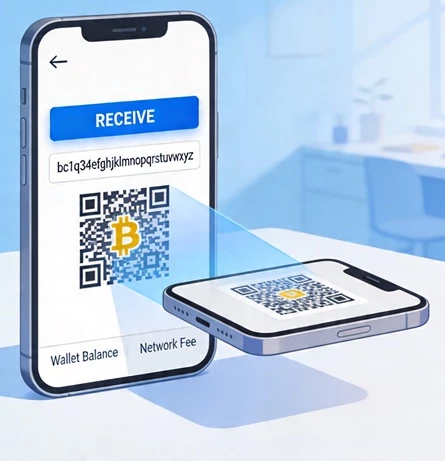
Table of Contents
What You Need to Send or Receive Bitcoin
Before you can send or receive Bitcoin, you need a few basic things set up.
1. A Bitcoin Wallet
You need a Bitcoin wallet, which can be:
- A software wallet (mobile or desktop app)
- A hardware wallet (offline device for security)
This wallet is what allows you to:
- Generate a Bitcoin address
- Send Bitcoin
- Receive Bitcoin
2. A Bitcoin Address
A Bitcoin address is like an account number.
- You use it to receive Bitcoin
- Others use it to send Bitcoin to you
Addresses come in different formats:
- P2PKH (legacy) → starts with “1”
- SegWit (P2SH) → starts with “3”
- bech32 (native SegWit) → starts with “bc1”
Most modern wallets use bech32 addresses, which are cheaper for transaction fees.
3. Balance + Network Connection
To send Bitcoin, you need:
- Enough BTC in your wallet
- Extra BTC to cover the transaction fee (network fee)
- An internet connection
How to Receive Bitcoin (Step-by-Step)
Receiving Bitcoin is simple — but you still need to do it correctly.
Generate a Receiving Address
- Open your wallet
- Tap or click the “Receive” button
- Your wallet will generate a Bitcoin address
- It will also show a QR code
This is your receiving address.
Share Your Address Securely
You can share your Bitcoin address in two ways:
- Copy and paste the address
- Let someone scan your QR code
👉 Best practice:
- Always copy and paste the address
- Never type it manually
- Double-check the first and last characters
What Happens After Someone Sends Bitcoin
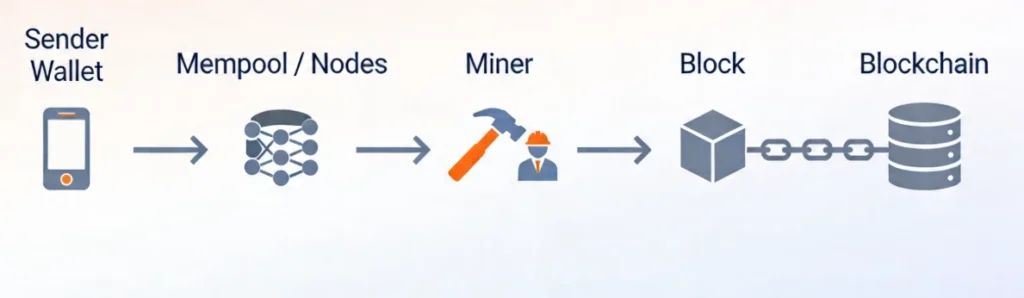
Once the sender sends BTC:
- The transaction appears as unconfirmed
- It is broadcast to the Bitcoin network
- Miners include it in a block
After that:
- 1 confirmation = first block
- More confirmations = more security
You’ll see the status update inside your wallet.
How to Send Bitcoin (Step-by-Step)
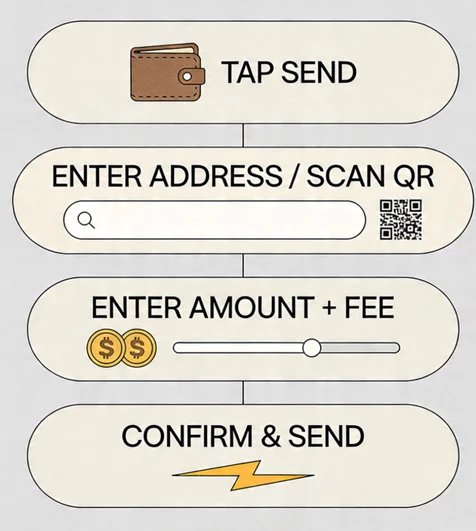
Sending Bitcoin requires more attention because mistakes are permanent.
1. Click “Send Bitcoin”
- Open your wallet
- Tap the “Send button”
- Select Bitcoin (BTC)
2. Enter or Scan the Address
You now need the recipient’s Bitcoin address.
Options:
- Paste the address
- Scan a QR code
👉 Critical rule:
- Always copy and paste address
- Never modify the address by hand
Even a single wrong character can send Bitcoin to the wrong place.
3. Enter the Amount and Choose Fee
Next, enter:
- Amount to send
- Transaction fee (network fee)
Fees are usually shown as:
- Low
- Medium
- High
More advanced wallets show:
👉 satoshis per vByte (sats/vB)
This determines how fast your transaction confirms.
4. Review and Confirm
Before sending:
- Double-check the address
- Confirm the amount
- Check the fee
Then press send / confirm.
Your transaction is now:
👉 Broadcast to the blockchain
Remember:
👉 Bitcoin transactions are irreversible
How Bitcoin Transactions Work (Simple Explanation)
From a user perspective, sending Bitcoin is simple:
👉 Address + Amount + Fee → Send
Behind the scenes, it’s more complex.
Inputs and Outputs
Bitcoin uses a system called UTXO (Unspent Transaction Outputs).
- Inputs → where the Bitcoin comes from
- Outputs → where it goes
Change Address
If you send less than your total balance:
- The remainder is sent back to your wallet
- This is called a change address
Role of the Network
When you send a transaction:
- It is broadcast to the Bitcoin network
- Miners verify it
- It gets included in a block
Once confirmed, it becomes part of the blockchain permanently.
Fees, Speed, and Confirmations
Understanding fees is key to sending Bitcoin correctly.
How Fees Are Set
Bitcoin fees depend on:
- Network demand
- Transaction size
- Fee rate (sats/vB)
Higher fee = faster confirmation
Lower fee = slower confirmation
Typical Transaction Time
Bitcoin blocks are mined roughly every:
👉 10 minutes
But actual confirmation time can be:
- 10 minutes → fast
- 30–60 minutes → normal
- Several hours → low fee
- Rarely days → congestion
What Confirmations Mean
Each new block adds a confirmation.
- 1 confirmation → basic
- 3 confirmations → moderate
- 6 confirmations → high security
For large transactions, more confirmations are recommended.
How to Check If Your Bitcoin Transaction Worked
After sending Bitcoin, you may want to track it.
Using Your Wallet
Your wallet shows:
- Transaction history
- Status (pending / confirmed)
Using a Block Explorer
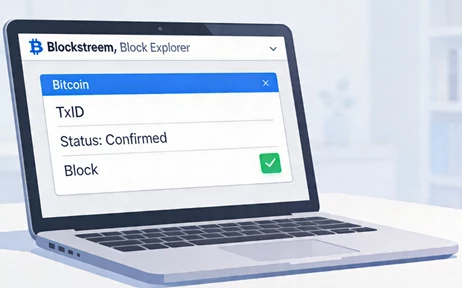
You can also use a block explorer like:
- blockstream.info
Steps:
- Copy your transaction ID (txid)
- Paste it into a block explorer
- View status
Transaction Status Types
- Unconfirmed transaction → waiting for inclusion
- Confirmed transaction → included in a block
Privacy Tip
Avoid repeatedly searching your main address.
Use txid instead to preserve privacy.
Common Mistakes and Security Tips
Most Bitcoin mistakes are preventable.
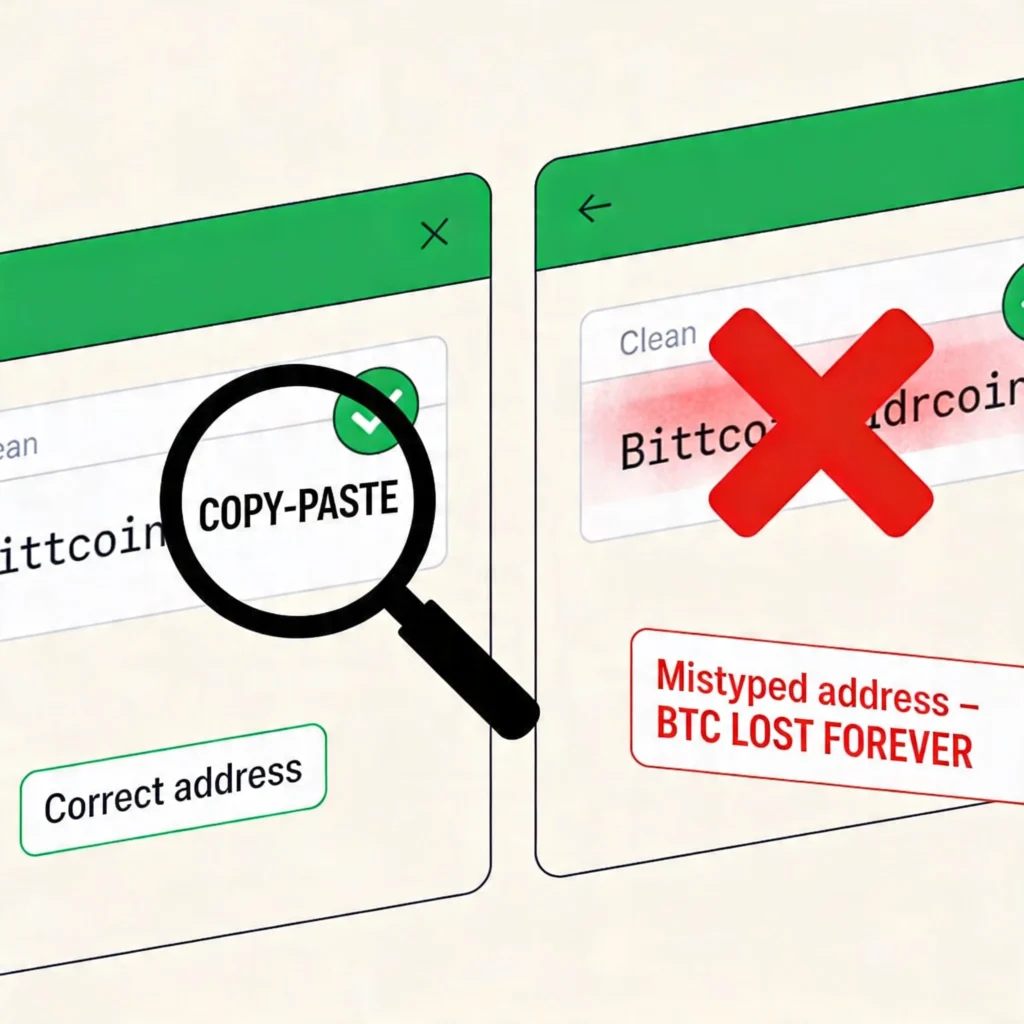
Mistake 1: Wrong Address
If you send to the wrong address:
👉 Bitcoin is lost forever
Always:
Verify first and last characters
Double-check address
Mistake 2: Manual Typing
Never type addresses manually.
👉 Always copy and paste
Mistake 3: Ignoring Fees
Low fees can result in:
- Long delays
- Stuck transactions
Mistake 4: No Test Transaction
For large amounts:
👉 Always test with a small amount first
Mistake 5: Unsafe Sharing
Avoid:
- Posting addresses publicly
- Sending via insecure channels
- Using screenshots
Key Security Rules
- Double-check address
- Never rush transactions
- Confirm network (BTC, not testnet)
- Use trusted wallets
Quick Cheat-Sheet
| Action | What you click | What you must enter | What to watch for |
|---|---|---|---|
| Receive Bitcoin | Receive / Show Address | Wallet generates address | Correct format, QR matches |
| Send Bitcoin | Send button | Address, amount, fee | Copy-paste address, correct network |
On-Chain vs Lightning Transactions (What’s the Difference?)
When sending Bitcoin, there are two main ways transactions can happen:
On-Chain Transactions (Standard Bitcoin)
This is what most beginners use.
- Recorded directly on the Bitcoin blockchain
- Requires confirmations (usually 10–60 minutes)
- Fees depend on network congestion
- Highly secure and irreversible
This is the method explained throughout this guide.
Lightning Network (Faster & Cheaper)
The Lightning Network is built on top of Bitcoin to enable:
- near-instant transactions
- extremely low fees
- better scalability for everyday payments
Lightning transactions happen off-chain, meaning they don’t require waiting for block confirmations.
👉 Learn more:
Lightning Network Guide (coming soon)
Which One Should You Use?
- Use on-chain for:
- larger transfers
- long-term storage
- maximum security
- Use Lightning for:
- small payments
- fast transactions
- everyday use
Choose the Right Wallet First
Before sending or receiving Bitcoin, make sure you’re using a secure wallet.
Different wallets offer different features, including support for Lightning.
👉 Compare options:
Best Bitcoin Wallets (2026) → bitcoin/best-bitcoin-wallets-2026
Security Reminder (Very Important)
Bitcoin transactions are irreversible. Once sent, they cannot be undone.
That’s why security matters:
- always double-check addresses
- start with a small test transaction
- avoid copying addresses manually
- beware of clipboard malware
👉 Learn full security practices:
Bitcoin Self-Custody Guide → bitcoin/bitcoin-self-custody
Where This Fits in Your Bitcoin Journey
This guide is part of the practical side of using Bitcoin.
👉 Recommended flow:
- → Buy Bitcoin → /bitcoin/how-to-buy-bitcoin
- → Choose a wallet → /bitcoin/best-bitcoin-wallets-2026
- → Secure your funds → /bitcoin/bitcoin-self-custody
- → Learn transactions → (this page)
Final Thoughts
Learning how to send and receive Bitcoin transactions gives you full control over your funds.
It all comes down to a few key things:
- Understanding the Bitcoin address
- Choosing the right transaction fee
- Verifying everything before sending
👉 Bitcoin removes middlemen — but also removes safety nets
Once you understand how transactions work, you eliminate most risks.
What is a Bitcoin address and how do I get one?
A Bitcoin address is a unique string of letters and numbers used to receive Bitcoin. You can generate a Bitcoin address by opening your wallet and clicking the receive button. Most wallets also provide a QR code that represents the same address.
How do I receive Bitcoin in my wallet?
To receive Bitcoin, open your wallet, tap the receive button, and copy your Bitcoin address or share the QR code. The sender can then send Bitcoin to that address. Once sent, the transaction will appear as unconfirmed until it receives network confirmations.
How do I send Bitcoin to someone or to my own wallet?
To send Bitcoin, open your wallet, tap the send button, paste the recipient’s Bitcoin address or scan their QR code, enter the amount, choose a transaction fee, and confirm the transaction. Always double-check the address before sending, as Bitcoin transactions cannot be reversed.
How much does a Bitcoin transaction fee cost?
Bitcoin transaction fees vary depending on network demand and are typically measured in satoshis per vByte (sats/vB). Fees can range from a few cents during low congestion to several dollars during busy periods. Higher fees result in faster confirmations.
How long does it take to send or receive Bitcoin?
How long does it take to send or receive Bitcoin?
Bitcoin transactions usually take around 10 minutes for the first confirmation, but can take longer depending on the fee paid and network congestion. Most transactions are considered secure after 3 to 6 confirmations.
How do I know if my Bitcoin transaction went through?
You can check your Bitcoin transaction status in your wallet or by using a block explorer. Enter your transaction ID (txid) or address to see whether the transaction is unconfirmed or confirmed and how many confirmations it has received.
What happens if I send Bitcoin to the wrong address?
If you send Bitcoin to the wrong address, the transaction cannot be reversed and the funds are likely lost permanently. This is why it is critical to double-check the address and always test with a small amount before sending large transactions.