Bitcoin security best practices 2026 are no longer only about buying a hardware wallet and writing down a seed phrase. In 2026, the biggest threats for many Bitcoin users are phishing, fake wallet apps, SIM-swap attacks, malware, fake support accounts, and weak two-factor authentication. A strong Bitcoin setup now needs multiple layers: secure passwords, phishing-resistant 2FA, safe wallet habits, transaction verification, address whitelisting, and careful seed phrase protection.
This guide focuses on the most practical Bitcoin security best practices 2026 for everyday users who want to protect Bitcoin from phishing, secure exchange accounts, avoid crypto phishing traps, and upgrade from weak SMS codes to stronger 2FA methods.
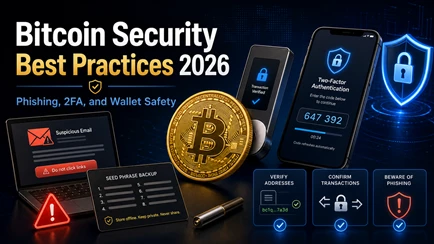
Table of Contents
Why Bitcoin Phishing Is Worse in 2026
Bitcoin phishing 2026 is more dangerous because scams look more professional than ever. Fake exchange emails, fake hardware wallet updates, fake wallet downloads, and fake support accounts can copy the branding, language, and layout of real companies. With AI tools, scammers can create better messages, cleaner websites, and more convincing impersonation attempts.
Crypto phishing usually works by making you panic or act fast. A scam email might say your account will be locked. A fake wallet popup might say your funds are at risk. A fake support agent might say you need to “verify” your seed phrase. These attacks are designed to bypass logic and trigger emotion.
The most common Bitcoin phishing 2026 threats include:
| Threat | How it works |
|---|---|
| Fake exchange emails | Sends you to a fake login page |
| Fake wallet apps | Steals seed phrases or private keys |
| Fake support | Pretends to help, then asks for recovery words |
| Lookalike domains | Uses small spelling changes in URLs |
| Clipboard malware | Replaces copied Bitcoin addresses |
| Seed phrase phishing | Tricks users into typing recovery words online |
The best way to protect Bitcoin from phishing is to slow down. Never click login links from emails or direct messages. Type official URLs manually or use bookmarks. Never enter your seed phrase into a website, app, form, or “support chat.” Ledger’s wallet security checklist emphasizes safe seed phrase storage, asset separation, and verifying transactions as key user responsibilities.
2FA Basics for Bitcoin Accounts
2FA for Bitcoin means using a second layer of protection in addition to your password. If your password is stolen, 2FA makes it harder for an attacker to access your exchange account, email account, or wallet-related service.
The FTC describes two-factor authentication as an added account-protection step that requires a second credential beyond your password. For Bitcoin users, 2FA should be enabled on:
| Account type | Why it matters |
|---|---|
| Crypto exchanges | Protects BTC balances and withdrawal settings |
| Email accounts | Email often controls password resets |
| Password managers | Stores exchange and wallet logins |
| Cloud storage | Prevents access to sensitive files |
| Broker accounts | Protects Bitcoin ETF or crypto-related accounts |
Strong Bitcoin security best practices 2026 require treating your email account as seriously as your exchange account. If an attacker controls your email, they may be able to reset passwords, approve withdrawals, or impersonate you with support teams.
But not all 2FA is equal. SMS 2FA is better than no 2FA, but it is weaker than an authenticator app or hardware security key. For serious Bitcoin users, the goal should be phishing-resistant 2FA where possible.
Authenticator Apps vs SMS 2FA: 2026 Upgrade
The most important 2FA upgrade in 2026 is moving from SMS codes to an authenticator app or hardware security key.
2FA authenticator app vs SMS is a simple comparison: SMS codes are sent to your phone number, while authenticator apps generate codes directly on your device. SMS can be attacked through a SIM-swap attack, where a scammer tricks or bribes a mobile carrier into moving your number to another SIM card. Once they control your phone number, they may receive SMS login codes.
The FTC warns that SIM-swap scams can allow criminals to receive access codes sent by text message. Trend Micro also recommends app-based or hardware 2FA instead of SMS and suggests setting a carrier-level PIN or port lock to reduce SIM-swap risk.
A better 2FA hierarchy looks like this:
| 2FA method | Security level | Best use |
|---|---|---|
| SMS code | Weakest | Better than nothing, but avoid for Bitcoin |
| Authenticator app | Stronger | Good for most exchange and email accounts |
| Hardware security key | Strongest | Best for high-value accounts |
| Passkeys / WebAuthn | Strong | Good phishing-resistant option where supported |
A hardware security key Bitcoin setup, such as a YubiKey-style device, can be especially strong because it uses cryptographic checks tied to the real website. CISA explains that phishing-resistant MFA is designed to resist phishing attacks better than weaker MFA methods.
For most users, the minimum upgrade is simple: use an authenticator app instead of SMS. For higher-value Bitcoin accounts, use a hardware security key and keep a backup key stored safely.
Practical Anti-Phishing Habits for Bitcoin Users
The best Bitcoin security best practices 2026 are not complicated. They are repeatable habits.
Start with URL verification. Never trust links from emails, Telegram, Discord, X, YouTube comments, or direct messages. Scammers often use lookalike domains with one changed letter or a different ending. Type the exchange or wallet website manually, then bookmark it.
Use an anti-phishing code on exchanges that support it. Binance explains that an anti-phishing code is a personalized code shown in legitimate Binance emails, helping users tell real messages from fake ones. This is not perfect protection, but it is a useful extra layer.
Anti-phishing checklist:
| Habit | Why it helps |
|---|---|
| Bookmark official sites | Avoids fake search results and typo domains |
| Never trust urgent messages | Scammers use panic |
| Use anti-phishing codes | Helps identify real exchange emails |
| Avoid sponsored search links | Fake ads can target wallet keywords |
| Check sender addresses | Look for small domain changes |
| Never share seed phrases | No real support agent needs them |
When learning how to avoid phishing attacks crypto users should remember one rule above all: your seed phrase is never needed for login, support, verification, staking, upgrades, airdrops, or wallet syncing.
If a website asks for your seed phrase, close it.
Secure Transaction Verification and Address Hygiene
Transaction verification is one of the most overlooked parts of Bitcoin security best practices 2026. Even if your wallet is secure, malware can still try to trick you into sending Bitcoin to the wrong address.
Clipboard-switching malware watches when you copy a Bitcoin address. When you paste it, the malware replaces it with an attacker’s address. Address poisoning works differently: scammers send tiny transactions from addresses that look similar to yours, hoping you copy the wrong address from your wallet history.
To protect yourself:
| Step | Action |
|---|---|
| Verify on-device | Check the address on your hardware wallet screen |
| Compare carefully | Check more than just the first and last characters |
| Use test transfers | Send a small amount first |
| Use address whitelist | Lock withdrawals to approved addresses |
| Enable withdrawal alerts | Get notified before or after movement |
| Avoid copy-paste laziness | Always confirm before signing |
An address whitelist is especially useful on exchanges. It lets you approve specific withdrawal addresses so funds cannot be sent elsewhere without extra security steps. This can slow down attackers even if they access your account.
Transaction verification should be treated like locking your front door. It is a small habit that can prevent a major loss.
Wallet-Level Security: Hardware, Seed Phrases, and Permissions
Crypto wallet security 2026 starts with separating hot wallets from cold storage. A hot wallet is connected to the internet and is useful for small spending amounts. A cold wallet or hardware wallet is better for long-term savings.
A hardware wallet keeps private keys offline and lets you verify transactions on a separate screen. Ledger’s DeFi safety guidance says users should sign transactions with their signer and never type a recovery phrase on a computer or phone.
Seed phrase phishing remains one of the biggest risks. A seed phrase should be written offline, stored safely, and never photographed. Do not store it in email, cloud drives, messaging apps, password managers, screenshots, or notes apps.
Better wallet habits:
| Security habit | Why it matters |
|---|---|
| Buy hardware wallets from official sources | Reduces supply-chain risk |
| Update firmware carefully | Fixes security issues |
| Use a watch-only wallet | Monitor balances without exposing keys |
| Keep savings separate | Limits damage if a hot wallet is compromised |
| Revoke risky permissions | Reduces exposure from connected apps |
| Use a passphrase only if understood | Adds security but increases recovery risk |
A watch-only wallet is useful because it lets you view your Bitcoin balance without using private keys. This is safer than constantly connecting a signing device just to check funds.
How to Respond If You Are Hit by Phishing or Lose 2FA Access
If you suspect crypto phishing, act quickly but carefully.
First, isolate the affected device. Disconnect it from the internet if malware may be involved. Use a clean device to change passwords on your email, exchange, and password manager. Replace weak 2FA with an authenticator app or hardware security key.
If you still control your wallet but your seed phrase may be exposed, move remaining BTC to a fresh wallet with a new seed phrase. Do not reuse the old wallet. If your exchange account was affected, contact official support through the bookmarked website only.
Response checklist:
| Problem | What to do |
|---|---|
| Phishing login clicked | Change password and 2FA from clean device |
| SIM-swap attack | Contact carrier, lock account, secure email |
| Seed phrase exposed | Move funds to a new wallet immediately |
| Malware suspected | Stop using device for crypto |
| Lost 2FA access | Use official recovery process only |
| Fake app installed | Remove it and create a new secure wallet |
Do not trust “recovery agents” who message you first. Many victims of Bitcoin scams are targeted again by fake recovery services.
What are Bitcoin security best practices in 2026?
In 2026, core Bitcoin security best practices include using a hardware wallet bought from the official vendor, never storing your seed phrase digitally, and enabling 2FA everywhere you log in. Always verify addresses on‑device, avoid suspicious links, and keep your firmware and software fully updated.
What is Bitcoin phishing and how can I avoid it?
Bitcoin phishing is when attackers trick you into giving away passwords, 2FA codes, or seed phrases via fake websites, emails, or social‑media DMs. To avoid it, bookmark official sites, check URLs carefully, never click unsolicited links, and use anti‑phishing codes or browser extensions that flag malicious domains.
Why is SMS 2FA risky for Bitcoin in 2026?
SMS 2FA is risky because attackers can hijack your phone number through SIM‑swap attacks and then intercept codes sent to your device. In 2026, security‑focused guides recommend switching to authenticator apps or hardware security keys instead of relying on text‑message codes.
Should I use an authenticator app or hardware key for Bitcoin 2FA?
Yes: authenticator apps like Google Authenticator or Authy are much safer than SMS, and hardware security keys (e.g., YubiKey) provide phishing‑resistant 2FA because they require physical interaction. Use them for exchanges, email, and any service that manages or approves Bitcoin transactions.
How do I protect my Bitcoin from phishing and drainers?
Protect your Bitcoin from phishing and drainers by only interacting with official domains, revoking old dApp permissions, and using hardware‑wallet‑based address verification. Never approve “connect wallet” prompts on unknown sites and keep anti‑phishing, ad‑blocker, and update practices tight.
What is a SIM‑swap attack and how does it affect Bitcoin?
A SIM‑swap attack occurs when a bad actor convinces your mobile carrier to transfer your phone number to a new SIM, giving them control of SMS‑based logins and 2FA. This can let them drain exchange accounts linked to your phone, which is a major reason Bitcoin guides now advise dropping SMS 2FA entirely.
How can I verify Bitcoin addresses safely before sending funds?
Verify Bitcoin addresses by checking at least the first and last 6–8 characters on your hardware‑wallet screen or a trusted wallet, never copying from the browser. Enable address‑whitelisting on exchanges and send a small test transaction before large transfers to catch clipboard‑switching malware.
Is 2FA enough to fully secure a Bitcoin‑related account?
No: 2FA raises the bar dramatically, but it is not enough on its own. You still need a strong unique password, hardware‑wallet‑based self‑custody, phishing‑awareness, and regular permission reviews for dApps and bridges to truly secure Bitcoin‑related accounts.
Final Thoughts: Bitcoin Security Best Practices 2026
The strongest Bitcoin security best practices 2026 are simple but strict: protect your seed phrase, use authenticator-app or hardware-key 2FA, avoid SMS when possible, verify URLs, use anti-phishing codes, confirm addresses on-device, and never rush transactions.
Bitcoin phishing 2026 is more advanced, but most attacks still rely on the same weakness: getting users to panic, click, paste, approve, or reveal something they should not. Good Bitcoin security is about building habits that make those mistakes less likely.
Use 2FA for Bitcoin accounts, avoid seed phrase phishing, protect Bitcoin from phishing with bookmarks and anti-phishing codes, and treat transaction verification as a required step. Your Bitcoin security system is not one tool. It is a routine.